The Deep Cleanup tool identifies subscribers with no evidence of legitimate use.
It is intentionally stricter about evidence than a simple “old account” rule. Registration age alone does not determine whether an account is spam.
Built-in safety window
A fixed 30-day safety window excludes recently created accounts from this deep candidate analysis.
This reduces the risk of classifying a new legitimate subscriber before there has been enough time for normal activity to appear.
Evidence that can exclude a user
Deep analysis can exclude users when there is evidence such as:
- administrator or another non-subscriber role;
- manual protection;
- content ownership;
- known access;
- profile data;
- sessions or application passwords;
- comments;
- commercial activity.
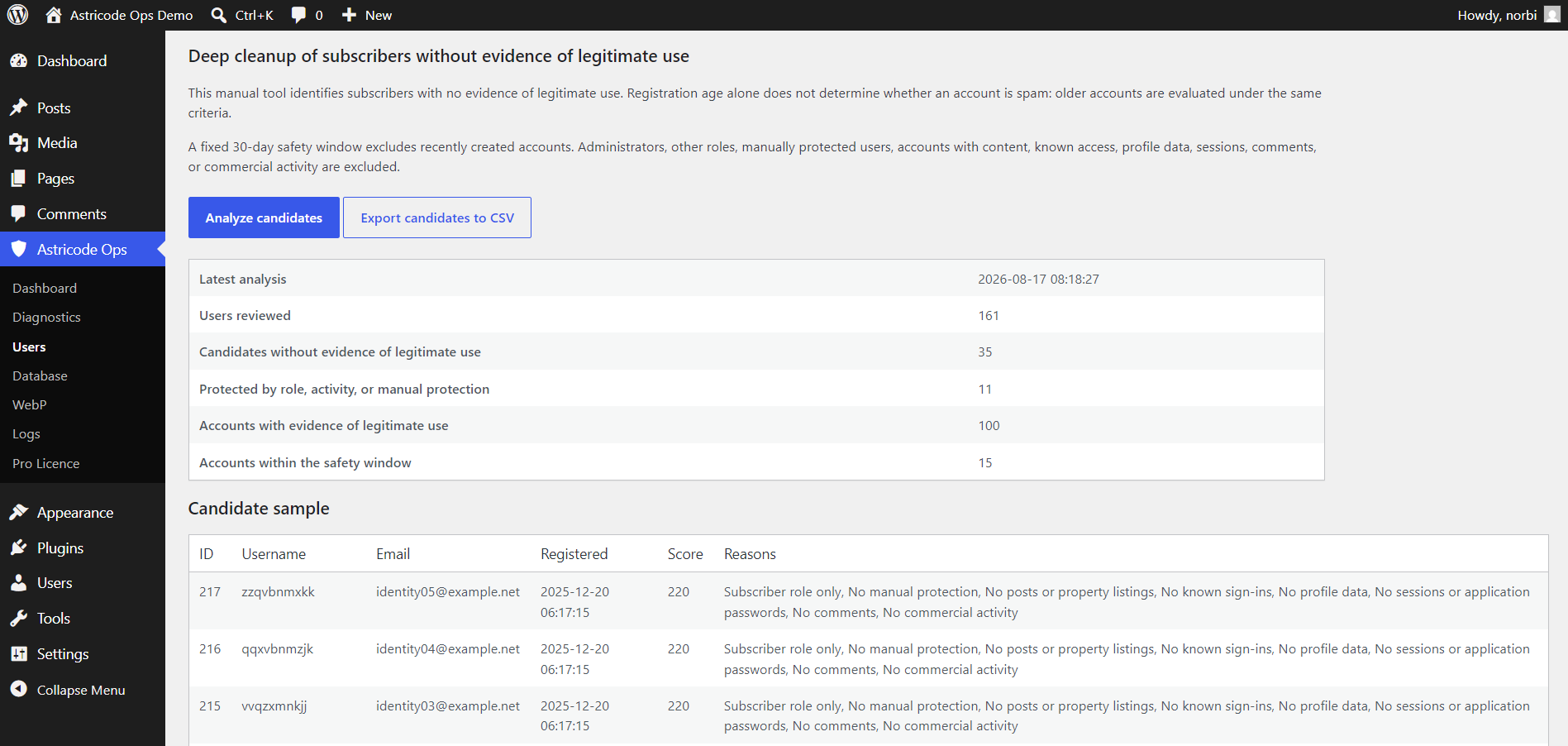
Analyze candidates
Select Analyze candidates to generate the latest analysis.
The result includes:
- users reviewed;
- candidates without evidence of legitimate use;
- protected users;
- accounts with evidence of legitimate use;
- accounts within the safety window.
Candidate sample
The candidate sample displays evidence explaining why an account qualifies, rather than presenting only a username.
Review these reasons carefully before using any separate deletion workflow.
Export to CSV
Use Export candidates to CSV when you want to review the candidate set outside WordPress, retain an audit copy or share the list with another administrator.
Because user information can be sensitive, store exported files securely.