Astricode Ops is installed as a standard WordPress plugin. Astricode Ops Pro is a private extension that depends on the base Astricode Ops plugin.
Minimum requirements
Astricode Ops 1.0.5 requires:
- WordPress 6.0 or later
- PHP 8.0 or later
Astricode Ops Pro 1.4.5 requires a compatible Astricode Ops 1.x installation. The Pro release is designed for the Astricode Ops 1.x major line and does not replace the base plugin.
For reliable maintenance operations, the server should also provide normal WordPress filesystem access, working database access and enough PHP memory and execution time for bounded maintenance batches.
Install Astricode Ops
- In WordPress, open Plugins → Add Plugin.
- Upload or install the Astricode Ops package.
- Activate Astricode Ops.
- Open Astricode Ops → Dashboard.
- Run Technical diagnostics if you want to verify the environment before starting maintenance.
After activation, the Astricode Ops menu provides access to Dashboard, Diagnostics, Users, Database, WebP and Logs.
Install Astricode Ops Pro
Astricode Ops Pro must be installed in addition to Astricode Ops.
- Make sure Astricode Ops is installed and active.
- Upload the Astricode Ops Pro package.
- Activate Astricode Ops Pro.
- Open Astricode Ops → Pro Licence.
- Activate a valid Pro licence if the installation is not already licensed.
- Validate the licence and confirm that Pro features are available.
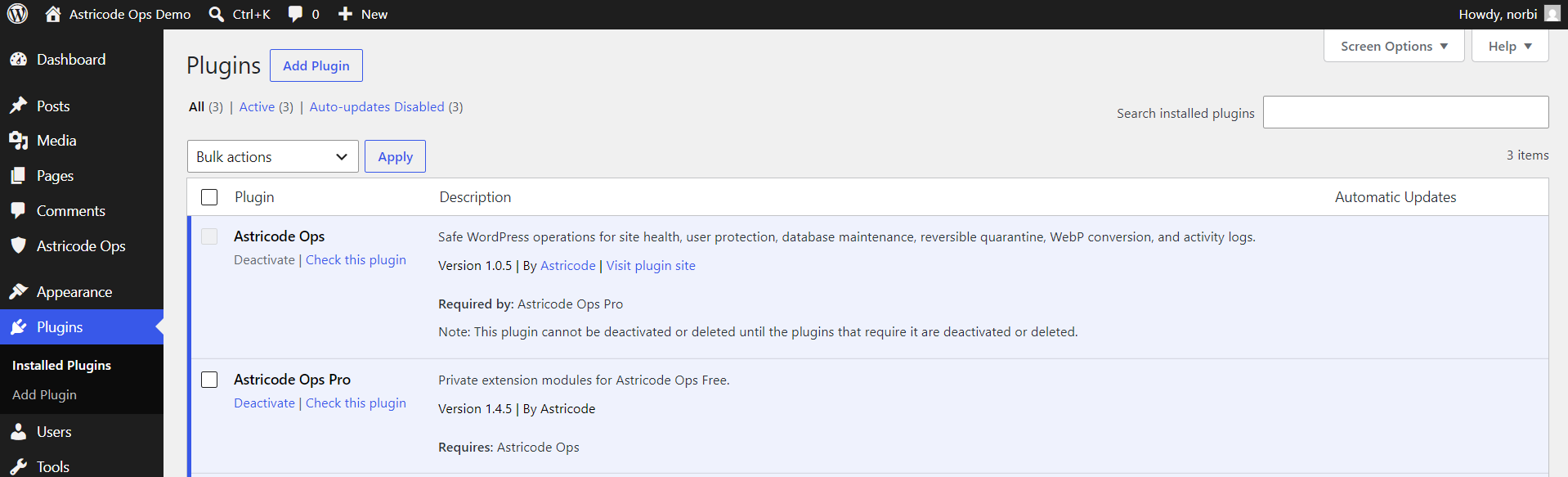
Dependency protection
Astricode Ops Pro is an extension of Astricode Ops. WordPress may prevent the base plugin from being deactivated while an active plugin depends on it.
This is intentional: Pro modules rely on the Free plugin runtime and extension API.
What happens if Pro cannot load
Astricode Ops Pro is designed to fail closed if the base plugin is missing or incompatible. Pro automation should not be assumed to be active merely because the Pro plugin files are installed.
If Pro features are unavailable:
- confirm that Astricode Ops is active;
- confirm that Free and Pro versions are compatible;
- confirm that the Pro licence is active;
- run Technical diagnostics;
- review Astricode Ops Logs for relevant events.
Recommended environment values
Technical Diagnostics evaluates runtime conditions that can affect heavier maintenance operations.
As a practical baseline:
- WordPress should have at least 128 MB of usable memory for comfortable operation;
- a 60-second PHP execution limit improves reliability during heavier bounded operations;
- scheduled tasks must be able to run either through WordPress cron or a correctly configured external cron.
These are operational recommendations, not substitutes for the minimum WordPress and PHP requirements above.
Before first maintenance
Before deleting users, metadata, revisions, trash or other persistent data:
- create a current database backup;
- verify that important users are protected where appropriate;
- run analysis before cleanup;
- start with conservative batch sizes on large sites;
- use reversible quarantine for supported advanced operations when you are uncertain about the data.